WORD PUZZLE CLASSIC
Bookworm Deluxe PC Game Letter Tiles, Words & Puzzles
Bookworm Deluxe is PopCap’s letter-tile word game for Windows PC, where you link neighbouring letters together to spell words, earn points and stop burning tiles from reaching the bottom. This independent guide covers its gameplay, Classic and Action modes, key features, system requirements and setup steps, all in one place.
An independent fan guide. Review the download details and requirements before installing.
Information focused on playing Bookworm Deluxe on Windows computers.
Link neighbouring letter tiles to spell words and build your score.
Plain, step-by-step guidance for downloading and setting up the game.
Simple explanations for new players and anyone returning to the classic.
What Is Bookworm Deluxe?
Bookworm Deluxe is a single-player word puzzle game from PopCap Games, the studio behind several well-known casual PC titles. It builds on the original Bookworm, released in 2003, and adds updated graphics, an Action game mode and a Hall of Fame for high scores.
The idea is simple. A grid of letter tiles fills the screen, and you connect neighbouring letters to spell English words. When a word is accepted, its tiles disappear and new letters drop in from above. Longer words and less common letters score more, so a strong vocabulary pays off. If you get stuck, you can scramble the board, but doing so can set more tiles on fire.
That balance of calm word-finding and rising pressure is what keeps the game interesting. This site explains how Bookworm Deluxe works, what to check before you download it for PC and how to get it running on Windows. Whether you played it years ago or are discovering it for the first time, the practical details are in one place.
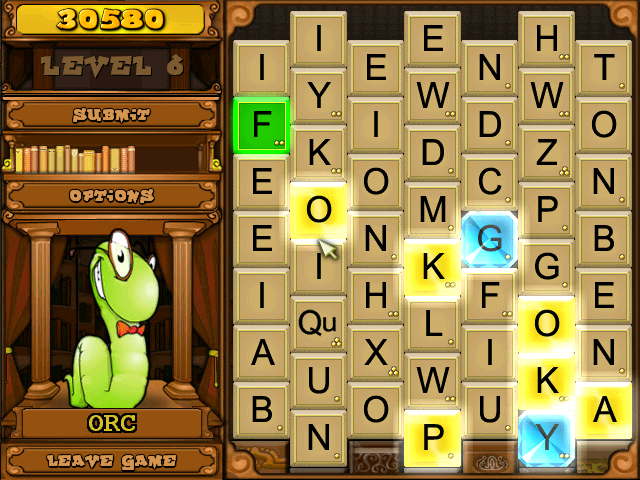
Bookworm Deluxe Key Features
A quick look at what makes Bookworm Deluxe more than a simple spelling exercise.
Word-building gameplay
Connect neighbouring letter tiles to form English words. Used letters disappear and new tiles drop in, so the grid is always changing.
Vocabulary challenge
Longer words and less common letters earn more points, which rewards players who know unusual words, not just short and easy ones.
Rising difficulty
Burning tiles appear more often as you progress. Use them in words before they burn down to the bottom of the board and end the game.
Bonus words and special tiles
Spelling the bonus word and using green or gold tiles in your words adds extra points on top of the normal word score.
Classic and Action modes
Classic mode lets you play at your own pace, while Action mode runs in real time and sets tiles on fire as the clock moves.
Replay value
Random letter layouts make every game different, and the Hall of Fame keeps your best scores as a target for the next session.
Scramble when stuck
If you cannot find a word, you can scramble the letters for a fresh layout. It helps, but each scramble can set more tiles on fire.
Simple mouse controls
Click letters in order to build a word, then submit it. The controls stay out of the way so you can focus on spelling.
Updated Deluxe presentation
The Deluxe edition refreshed the original game's graphics while keeping the same word-building core that made Bookworm popular.
Uses of Bookworm Deluxe
People play the game for different reasons. Here are some practical ways it can fit into your day.
Vocabulary practice
Searching the grid for longer words encourages you to recall words you rarely use and to notice new ones along the way.
Spelling practice
Words only count when they are spelled correctly, which makes the game a light, low-pressure way to practise spelling.
A short screen break
Classic mode lets you play at your own pace, so you can spell a few words during a break and stop whenever you like.
Keeping your mind busy
Finding words, planning around burning tiles and deciding when to scramble keep you thinking throughout a session.
Playing alongside family
The game is single-player, but you can take turns with family members or help each other spot words on the same screen.
Revisiting a PC classic
If you remember it from years ago, it is an easy way to return to a familiar game from the era of downloadable casual PC titles.
Benefits of Playing Bookworm Deluxe
Beyond simple entertainment, the game offers a few practical advantages for anyone who enjoys words.
Builds word awareness
Regular play gets you used to looking for prefixes, suffixes and shorter words hidden inside longer ones.
Rewards careful thinking
Longer and rarer words score more, so the game encourages you to look for a better option before submitting the first word you see.
Two ways to play
Choose Classic mode for a calm pace or Action mode when you want a quicker, more demanding game.
Easy to learn
The basic rule is simple: connect letters, spell a word, repeat. New players can understand how it works very quickly.
Clear sense of progress
Scores, rising difficulty and the Hall of Fame give you a simple way to see whether you are improving.
Family-friendly content
The game is built around letters, words and books, with simple non-violent content that suits players of many ages.
Bookworm Deluxe Classic vs Action Mode
The game includes two ways to play. This comparison shows how the modes differ so you can pick the one that suits you.
Both modes use the same letter grid and word-building rules. Only the timing and pressure change.
Download Bookworm Deluxe for PC
Review the file details below before you start. Make sure the version and supported Windows version match your computer, then use the button to begin the Bookworm Deluxe download.
1.13
12 MB
Windows PC
Windows 7, 8, 10, 11
Important: BookwormDeluxe.com is an independent information site and is not the game’s publisher. Check the file details before opening anything you download, scan it with up-to-date security software, and only install software you have the right to use.
How to Download Bookworm Deluxe
A few careful steps before and during the download help you avoid incomplete files and compatibility problems.
1. Check your PC first
Compare the system requirements and supported Windows version on this page with your computer before you download anything.
2. Use the download button
Go to the download section and review the version and file size, then select the Download Bookworm Deluxe button.
3. Save the file
Choose an easy location such as your Downloads folder. If your browser shows a warning, read it carefully before deciding to keep the file.
4. Confirm the download
Wait for the download to finish, check that the file size matches the details listed above and scan it with your security software.
How to Install Bookworm Deluxe on Windows
Installation is usually quick. The exact screens depend on the installer you download, so treat these steps as a general guide.
1. Download the installer
Use the download button on this page to save the setup file to your computer. Wait until the download has fully finished before opening it.
2. Find the downloaded file
Open your Downloads folder or the location your browser saved the file to. Check that the file matches the details listed in the download section.
3. Start the installation
Double-click the file to launch setup. If Windows asks for permission to make changes, confirm only if you trust the source of the file.
4. Follow the on-screen steps
Read each installer screen, choose an install location and review any options before continuing. Setup screens can differ between versions.
5. Launch and play
Open the game from the Start menu or a desktop shortcut if one was created, then choose a mode and start spelling words from the letter grid.
Bookworm Deluxe System Requirements
Bookworm Deluxe is an older 2D puzzle game, but it is still worth confirming that your PC meets the requirements for the version you plan to install.
Windows 98, ME, 2000 or XP
500 MHz or faster
128 MB RAM
15 MB free disk space
16-bit or 32-bit colour video card
DirectX 7.0 or later, DirectX-compatible sound card, mouse and keyboard
Requirements can vary between releases. Check the details for the exact version you download and compare them with your PC before installing.
Why Bookworm Deluxe Still Appeals to Word-Game Fans
Plenty of word games have come and gone, yet Bookworm Deluxe still has a loyal following. Much of that comes down to how clearly it rewards knowledge. Every word is scored on its length and the letters it uses, so finding a rare word feels earned rather than lucky.
The game also stays easy to read. There is no complex rulebook: find a word, submit it and watch new letters fall. Burning tiles add just enough pressure to make each choice matter, and the scramble option gives you a way out at a cost. That makes it easy to pick up for a short session and still satisfying over a long one.
People who enjoy crosswords, anagrams or tile-based word games tend to feel at home, because the same skills apply: spotting prefixes and suffixes, seeing shorter words hidden inside longer ones and planning a move ahead. Classic mode suits a relaxed pace, while Action mode tests how quickly you can think against the clock.
For many players, Bookworm Deluxe is also a nostalgic PC game. Returning players usually want to know whether it still runs on their current computer, which is why this guide concentrates on practical download, installation and compatibility information.
Bookworm Deluxe FAQ
Answers to common questions about playing, downloading and installing the game.
What is Bookworm Deluxe?
Bookworm Deluxe is a word puzzle game developed by PopCap Games. You connect adjacent letter tiles to spell words, earn points based on word length and letter value, and try to stop burning tiles from reaching the bottom of the board. The Deluxe edition added updated graphics, an Action mode and a Hall of Fame to the original Bookworm.
Can I play Bookworm Deluxe on Windows?
Bookworm Deluxe was released as a downloadable game for Windows PCs, so Windows is its main platform. Whether a particular copy runs well depends on the version you have and your Windows edition. Check the system requirements and Windows version listed on this page and compare them with your computer before installing.
How do I download Bookworm Deluxe?
Go to the download section on this page, where the button links to the file. Before downloading, review the listed version, file size and supported Windows version. Save the file somewhere easy to find, such as your Downloads folder, and wait for the download to finish completely before opening it.
How do I install Bookworm Deluxe?
Open the downloaded setup file, allow the installer to run if Windows asks for permission, and follow the on-screen instructions. Choose an install location, finish setup, then launch the game from the Start menu or a desktop shortcut. Installer screens can vary, so the installation section above gives a general step-by-step overview.
What type of game is Bookworm Deluxe?
It is a casual, single-player word puzzle game. The gameplay mixes vocabulary with quick pattern-spotting: you search a changing grid for words, choose between short safe words and longer high-scoring ones, and manage burning tiles. It suits fans of crosswords, anagram puzzles and other letter tile games.
What should I do if Bookworm Deluxe does not launch?
Restart your PC and try again. Make sure the installation finished without errors and that your system meets the listed requirements. You can also try running the game as an administrator or reinstalling it to a different folder. On newer Windows versions, the Compatibility tab in the program’s Properties window may help, although results vary.
Can Bookworm Deluxe run on newer versions of Windows?
It depends on the specific version of the game and your Windows setup. Some older PC games run on current Windows versions without problems, while others need compatibility settings or do not work reliably. There is no guarantee either way, so check the requirements listed for your download and test the game after installing.
Ready to Explore Bookworm Deluxe?
You now have the essentials: what Bookworm Deluxe is, how it plays and what to check before installing. Review the download details, confirm your PC is compatible and start spelling.